Interlude.Layout.Section
In Depth
Layout.Section(header, elements, collapsible: false, expanded: true)
A titled section: a heading with a bordered panel of elements under it.
The first reach for structure in a long form. Grouping six fields under "Naming" and four under "Output" turns a wall of inputs into two things to read, and costs one node.
With collapsible the user can fold it away. A folded section still submits every field inside it — folding hides, it does not exclude. To actually leave fields out of the answers, attach Behavior.VisibleIf: hidden fields are never validated and never block submission.
The inputs are:
header(string) — The section's title.elements(list of FormElement) — What goes inside.collapsible(boolean, defaults tofalse) — Let the user fold the section away.expanded(boolean, defaults totrue) — Whether a collapsible section starts open.
Returns element — The form element.
Search terms: section, group, box, fieldset, collapsible.
About the Layout nodes
Arranging and decorating a form: sections, rows, grids, tabs, and the elements that show something rather than ask something.
Every container takes a list of elements. None of them has a single-element overload, on purpose: with both available, a graph that passes one element to a list port gets replication instead of a container, and produces N containers of one child each rather than one container of N. Pass a list, even a list of one.
Example File
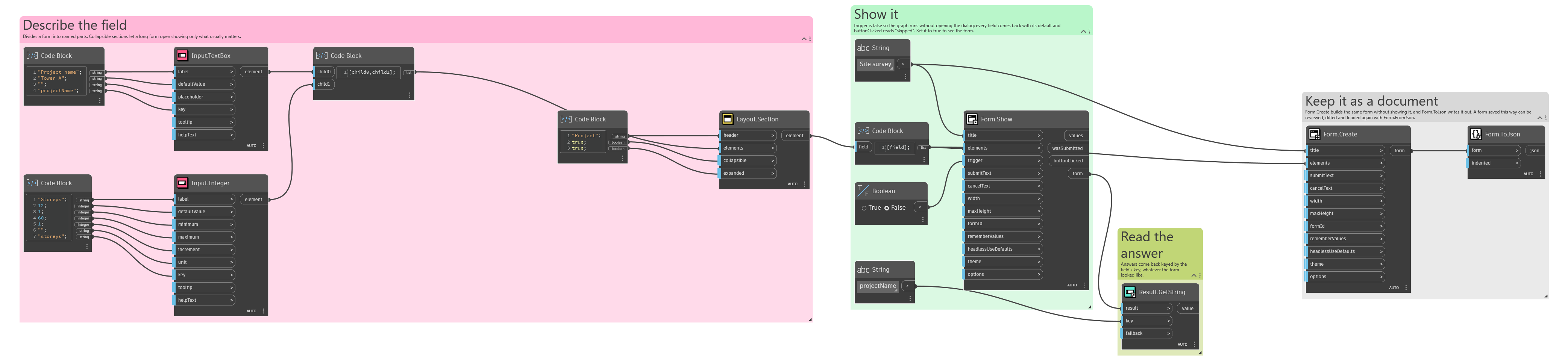
An example graph ships beside this page: Interlude.Layout.Section.dyn
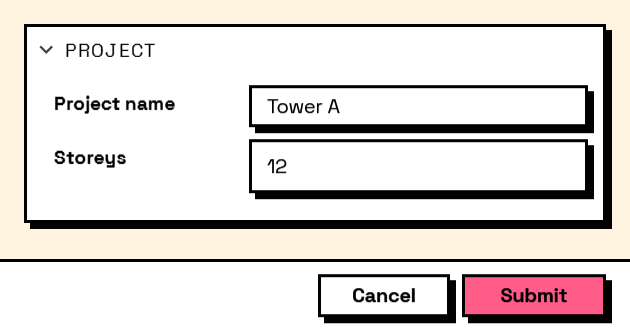
The form it builds: